Posts

Showing posts with the label NAV

Don't Let CRM Authentication Changes Tank Your Integration
Image
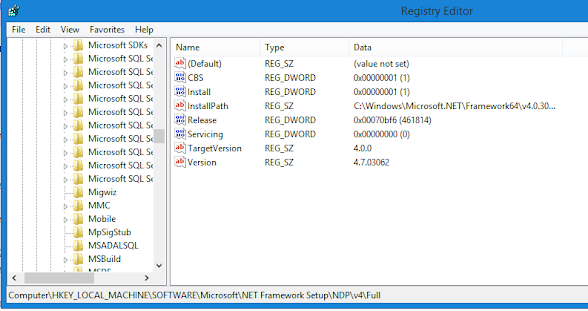
 It would seem that Microsoft is currently in the process of phasing out "basic style" authentication methods.  They intended to phase out basic authentication in Business Central 2021 wave 1 but that got pushed back to 2022 wave 1.  For CRM, though, the time is now .  For those of you still running on older NAV systems, you are going to start seeing CRM integration break in the coming months due to elimination of Regional Discovery Services .  There are different options to buy yourself some time but you should start coming to terms with the fact that OAuth authentication is is in your future. There is a short term solution (until April 2022) for NAV versions 16 and above.  For 17, there will be a hotfix to implement OAuth but for 16 you will most likely need to do a technical upgrade along with merging in the necessary OAuth code - and that's just a guess.  For this post, I'm going to document the process for implementing the short term fix to updat...
Putting SOAP on a rope (part 1)

Image
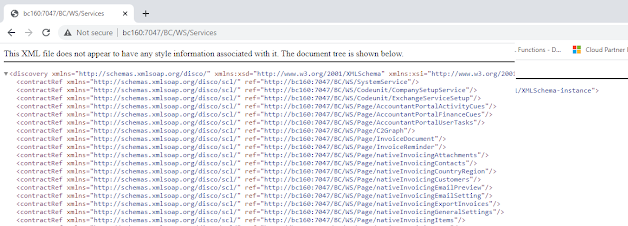
First, forgive the title of this post.  I couldn't help myself. Now that we're past that, every now and then I get called on to make SOAP work for customers.  It used to be pretty popular back in the day (2009-ish) but now REST (specifically OData in the NAV/BC world) is all the rage.  I like OData, it's easier to work with for most purposes but even now there are still a few things that SOAP is better at.  One thing that makes SOAP difficult is that it's got a more complex structure and is not easily understood.  With OData, you just set your verb and give it a little JSON and you're up and running.  I recently had to help someone get SOAP working and in the process I debugged the calls with Wireshark and Fiddler and I wanted to document what I got out of that.  It might just help me a few years from now and help someone else sooner. First the basics.  In the interest of being complete, I'll jot down the first steps just in case anyone else is lo...

Changing Schema in AL Development

Image
In software development, it is rare that you get it right the first time.  The rules for AL extensions are very unforgiving and if you accidentally create a field with the wrong type, you can find yourself unable to change it.  Fortunately there is a way to handle this.  By inserting a schema SchemaUpdateMode value into your launch.json you can control exactly how deploying your development app handles the data. There are three values: ForceSync: This pushes schema changes through, deleting any incompatible data. Recreate: Completely deletes your tables and data and creates them from scratch.  This is useful if you have a setup routine that creates data. Synchronize: This is the default update mode.  It allows the least flexibility but should not be used unless you know what your changing and don't have prior versions deployed already.  If you choose to use ForceSync or Recreate modes, change the SchemaUpdateMode back to synchronize once you are done...

Filtering Lookups

Image
A coworker sent me an email today asking about a SQL query for returning results based on the value in a setup table.  I sent him the correct syntax and then inquired as to the purpose of this.  His response was that he had a request from a customer to filter the item lookup on the sales line table based on a setting in Sales & Receivables Setup.  He was going to use a table linked to a view, which among other things would be rather messy.  I then proceeded to show him the following method for creating a filtered lookup. It is a little known fact that code in the OnOpenPage trigger of a lookup page is executed when the lookup dropdown is displayed. Here is a lookup to the item table in a Cronus database. Now, let's say we want to filter to just items beginning with "11".  We could add this code to the OnOpenPage trigger of the Item List. Now the lookup returns this. Now, what if we want to make it conditional?  In this case, the fi...

Dealing with Consistency Errors

Image
NAV's consistency function is seldom used but very valuable when you need it.  Simply put, it ensures logical integrity at the transaction level.  This means that when a transaction is committed, it has followed any business logic that you wish to enforce .   That last part is important.  It is up to the developer to determine which conditions make a transaction consistent and then set the consistency flag at an appropriate spot in the code.  The use of this function does have one major drawback: it is anywhere from difficult to impossible to track down the source of a consistency error using the debugger.  Because the source of a consistency error depends on what may or may not have happened during the course of the transaction, the best way to figure out what went wrong is to look at the data that got generated at the state it was in right before the commit. If only there was a way to do this... Step 1: Create a debugging instance. First, crea...