Posts

Don't Let CRM Authentication Changes Tank Your Integration
Image
 It would seem that Microsoft is currently in the process of phasing out "basic style" authentication methods.  They intended to phase out basic authentication in Business Central 2021 wave 1 but that got pushed back to 2022 wave 1.  For CRM, though, the time is now .  For those of you still running on older NAV systems, you are going to start seeing CRM integration break in the coming months due to elimination of Regional Discovery Services .  There are different options to buy yourself some time but you should start coming to terms with the fact that OAuth authentication is is in your future. There is a short term solution (until April 2022) for NAV versions 16 and above.  For 17, there will be a hotfix to implement OAuth but for 16 you will most likely need to do a technical upgrade along with merging in the necessary OAuth code - and that's just a guess.  For this post, I'm going to document the process for implementing the short term fix to updat...
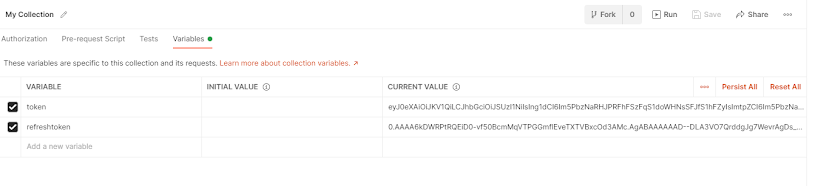
Updating Access Tokens in Postman

Image
 Microsoft recently changed their rules regarding Azure issued token expirations.  Tokens will now expire after an hour and it appears there's very little you can do about that.  So, what do you do?  You need to make use of the refresh token.  A refresh token allows you go generate a new token and will have a much longer expiration time - Azure tokens have a three month lifespan by default.  When you generate a new token, you get a new refresh token also.  This means that while your token only lasts an hour, you can go as long as three months before you need to actually go through the token request process again.  As long as you use your refresh token before it expires (and it's not revoked), your access will effectively never expire. From a security perspective, this is a good thing as it limits the damage that a misplaced token can do since a token can be revoked in no more than an hour.  From a development perspective, it means that applic...

Error with Zetadocs on Sharepoint Online

Image
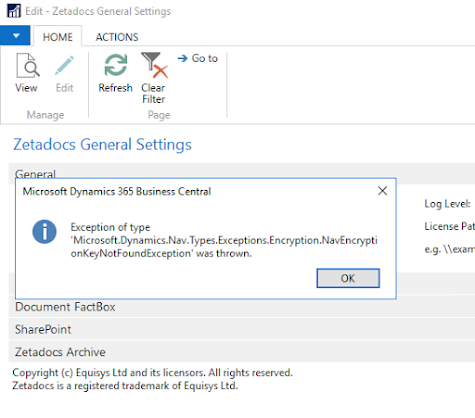
I was recently setting up Zetadocs on a new server (existing database) and I got this message when closing the General Settings screen. Exception of type 'Microsoft.Dynamics.Nav.Types.Exceptions.Encryption.NavEncryptionKeyNotFoundException' was thrown. I couldn't find the error anywhere in Google, hence this post.  The problem is that on a new server, the key needed to decrypt Sharepoint Online's login information will not have been installed.  To fix this, first connect to the service where Zetadocs was first installed (or is working) and open the Enrcryption Management screen. Click the "Export Encryption Key" button and save the key to a file.  You will be prompted to secure the file with a password. Once you have the file saved, copy it to the new server then go into the Encryption Management screen on its service and click "Import Encryption Key".  Enter the password for your file and the new key will be imported.

O(Auth) brave new world

Image
With Microsoft's declaration of intent to remove support of basic authentication for cloud Business Central instances, it's time to start figuring out the not-so-new kid on the block: OAuth.  OAuth (Open Authentication) has been around for some time now and it provides many advantages over legacy methods.  One of the biggest ones has been Single Sign On.  Rather than having to create a multitude of accounts for an ever growing list of websites, you can use you Gmail account or Facebook login.  The client site then gets a token that is unrelated to your actual credentials and you have one less password to worry about.  Of course, this all comes at a cost and it can be pretty painful if you have any applications that need to be migrated and you are on the bleeding edge where documentation is sparse and a bit confusing.  After trudging through the muddy waters of Business Central OAuth documentation, I'm pleased to say I've come out the other side and I can n...

Putting SOAP on a rope (part 1)

Image
First, forgive the title of this post.  I couldn't help myself. Now that we're past that, every now and then I get called on to make SOAP work for customers.  It used to be pretty popular back in the day (2009-ish) but now REST (specifically OData in the NAV/BC world) is all the rage.  I like OData, it's easier to work with for most purposes but even now there are still a few things that SOAP is better at.  One thing that makes SOAP difficult is that it's got a more complex structure and is not easily understood.  With OData, you just set your verb and give it a little JSON and you're up and running.  I recently had to help someone get SOAP working and in the process I debugged the calls with Wireshark and Fiddler and I wanted to document what I got out of that.  It might just help me a few years from now and help someone else sooner. First the basics.  In the interest of being complete, I'll jot down the first steps just in case anyone else is lo...

When you are falsely accused of not having SQL Server Report Builder installed

Today I was updating some report objects from a text file for an older BC13 upgrade.  Yes, even at this late date BC13 can be an "upgrade".  Long story.  Anyhow, in the process of pulling in reports I got an error message To upgrade reports, you must have Microsoft SQL Server 2016 Report Builder installed. The problem is, I did have SQL Server 2016 Report Builder installed.  Some cursory Googling revealed that someone else had run across this and their solution was to install an older version of the report builder.  Not satisfied with this option, I ran the import under Process Monitor .  Process Monitor showed that BC was looking for Microsoft.ReportingServices.RdlObjectModel.dll and not finding it.  Sure enough, that file was nowhere to be found.  I did find an article on that indicating that it was a part of older report builder installations and I managed to find it on my development system under some Docker containers (of all places)....

Debugging a Sandbox by Any Other Name

Image
 Recently, I've noticed that trying to debug a sandbox that isn't named "Sandbox" has not worked.  The first few times I just worked around it but I finally came to a place where I couldn't ignore it anymore.  While my extension was deploying to the correct sandbox, the browser was opening to the default sandbox and errors were just causing the web client to hang and VS Code's debugger to terminate.  The solution was pretty simple: there is a server option in the launch.json that you can use to specify the correct URL.  Once I did that, debugging worked as it should.

Accessing AL Extension Source Code in BC

Image
For a while now, I've noticed that the Visual Studio Code feature that pulls up source code from other extensions (including system extensions) doesn't behave as one might expect.  Sometimes it pulls up the full object code and other times it pulls up a skeleton.  For instance, I just pulled up the definition for the Res. Journal Line table and this is what I got.  Nothing but field and variable declarations. Now look at what happens when I pull up the definition while debugging my extension in a Docker container. Notice the difference?  The results seem to be cached with the project, as once I've pulled the definition with the debugger active I can pull it again anytime and get the full source.  I don't believe this will work using a BC sandbox environment but if I find otherwise, I'll post it.

NAV 2018 Styles

Image
The NAV Style/StyleExpr properties have been around for a while but I couldn't find an accurate table of the values as they are circa 2018.  Hence, a quick little reference:

Adding XML Formatting to a Web API Controller

Image
A .NET API project will return JSON by default but sometimes you need something else.  By adding a new input and output formatter, you can accomplish this.  The ConfigureServices function in the Startup.cs file can be changed with the following code:             services.AddMvc(options =>             {                 options.InputFormatters.Add(new XmlSerializerInputFormatter(options));                 options.OutputFormatters.Add(new XmlSerializerOutputFormatter());                 options.OutputFormatters.Add(new StringOutputFormatter());             }); You will also need to be using Microsoft.AspNetCore.Mvc.Formatters.

Accessing Dynamics NAV OData with Postman

Image
1/13/20 - This apparently only applies to NAV.  See note at the end for connecting to Business Central It took me a little while to nail down authenticating to a Dynamics NAV OData web service with Postman.  Fiddler does it quite easily but I suspect it is a little more intelligent while Postman requires the correct settings for everything. First, in NAV you need to have NTLM authentication enabled.  I have found this is required any time you want to use the web services with anything other than .NET (and even then...). Now, with NTLM enabled, you might think the authentication is NTLM but you'd be wrong.  It's Digest.  There are two flavors of Digest: MD5 and MD5-sess.  By default, Postman will come up with MD5.  I discovered it was supposed to be MD5-sess by using Chrome's developer console.  With this console open, make the GET request and you can see all of the data being exchanged. Within the Authorization header, toward the end, you wi...

Hosting .NET Core Apps in IIS

Image
While .NET Core is intended to be run as a standalone application, I enjoy the convenience of running it through IIS on client systems.  This is especially nice since the applications I develop are microservices meant to augment the functionality of the Dynamics Business Central ERP system.  Often I will piggyback these on the already open port for the web client thus bypassing the need to involve IT in the process. All of the documentation I've seen shows this being a much more complicated process than I have found it to be.  For my own memory and for the edification of the rest of the world (if anyone else reads this), here are the steps I have found to be needed to deploy a .NET Core application on IIS as of 2.2. Download the latest .NET Core Hosting Bundle  and install it. Restart IIS using IISRESET from an elevated command prompt (or just restart the server if you feel like it). Take the published version of your application produced by Visual Studio ...

Changing Schema in AL Development

Image
In software development, it is rare that you get it right the first time.  The rules for AL extensions are very unforgiving and if you accidentally create a field with the wrong type, you can find yourself unable to change it.  Fortunately there is a way to handle this.  By inserting a schema SchemaUpdateMode value into your launch.json you can control exactly how deploying your development app handles the data. There are three values: ForceSync: This pushes schema changes through, deleting any incompatible data. Recreate: Completely deletes your tables and data and creates them from scratch.  This is useful if you have a setup routine that creates data. Synchronize: This is the default update mode.  It allows the least flexibility but should not be used unless you know what your changing and don't have prior versions deployed already.  If you choose to use ForceSync or Recreate modes, change the SchemaUpdateMode back to synchronize once you are done...

Troubleshooting SQL Locks

Image
SQL Locking is one of the most frustrating and misunderstood issues you will encounter when dealing with SQL Server.  One good tool for getting a handle on this is SQL Profiler.  There is a blocked process event that it can monitor but it must first be enabled.  To enable SQL blocked process monitoring, use the sp_reconfigure command: sp_configure   'show advanced options ' ,  1    RECONFIGURE GO sp_configure   'blocked process threshold' ,  10 GO RECONFIGURE GO The blocked process threshold needs to be set because blocking happens quite frequently and it's up to you to determine when it becomes a problem.  This is typically going to be right around the time the application times out and the user gets an error message.  Once this is enabled, you can use the SQL Profiler tool to collect locking events. I will typically take out the SQL statement and procedure events, since these tend to bloat the file and generate a l...

Chrome, CORS and .NET CORE

Image
Most of this information came from  https://stackoverflow.com/questions/53479946/how-to-handle-option-header-in-dot-net-core-web-api Getting a cross-origin resource working with Javascript and .NET core should be a simple task but if you're hosting it on IIS, there's an extra step. Instructions for setting up CORS in .NET CORE are all over the place so I'm just going to post an image of what it should look like. The real trick is with IIS.  You need to add a Request Filter to allow the OPTIONS verb. 

Changing Passwords in Powershell

Image
Our current network policy requires a password change ever three months.  Unfortunately, my Docker containers aren't connected to the domain so they don't recognize the change.  That means, if I still want to use Windows authentication when connecting to their services, I have to update the containers.  It's simple but I don't do it enough to keep it in my brain so I'm putting it here. It's just a matter of capturing your password as a secure string and using the Set-LocalUser command to set it.

Business Central Report Extensions with No Output

I did a Dynamics Business Central report with an RDLC layout using the txt2nav tool and I have a couple of notes. First, the txt2nav tool uses delta files to generate it's output but if you don't want to compare anything, just export the objects as described in the documentation and rename them to .delta files. Second and most importantly, if you're doing extensions with RDLC files, VS Code will want the layouts in the root folder of your project.  If they're not there, it will create them for you and leave you with reports that have no output.  If this happens to you, you will notice that the copied file is much smaller than the original.  The solution is to either copy or move your RDLC layout to the root folder so that VS Code doesn't try to do it for you.

Log Shipping Across FTP

Image
I had a situation where I needed to create a replica database for reporting using log shipping with two servers that aren't on the same network.  There is an excellent article describing the process on Niall Best's blog .  The instructions got me the setup that I needed on my remote SQL server but when I went to run the restore process, nothing happened. Running the sqllogship.exe command from a command prompt gave me a "Could not find a log backup file that could be applied to secondary database" message in the results.  After confirming that my path settings were correct in the log_shipping_secondary table, I ran the sqllogship command with Process Monitor going.  Process Monitor showed that sqllogship was looking for files named "MyDatabase_*.trn".  Because my primary and secondary database names are the same, I'm not sure if the MyDatabase value is the primary or the secondary.  I would start with the primary and if that doesn't work, try the s...

Filtering Lookups

Image
A coworker sent me an email today asking about a SQL query for returning results based on the value in a setup table.  I sent him the correct syntax and then inquired as to the purpose of this.  His response was that he had a request from a customer to filter the item lookup on the sales line table based on a setting in Sales & Receivables Setup.  He was going to use a table linked to a view, which among other things would be rather messy.  I then proceeded to show him the following method for creating a filtered lookup. It is a little known fact that code in the OnOpenPage trigger of a lookup page is executed when the lookup dropdown is displayed. Here is a lookup to the item table in a Cronus database. Now, let's say we want to filter to just items beginning with "11".  We could add this code to the OnOpenPage trigger of the Item List. Now the lookup returns this. Now, what if we want to make it conditional?  In this case, the fi...